Most established businesses have quietly standardized every AI-dependent workflow on one tool. Proposals, client prep, reporting, follow-up: one subscription, one login, one point of failure.
That design gets tested the morning your primary tool goes down with a client call due at 9am.
Fresh data puts a number on the risk. TechTimes' coverage of an IncidentHub tracker report counted 28 service disruptions on the commercial tier of Anthropic's Claude platform in the 30 days from July 25 to August 24, 2026. That is a third-party count, not an official provider total.
Treat one rough month for one provider as a data point, and treat the pattern behind it as the real finding: no commercial AI tool sells small businesses an enterprise-grade uptime guarantee. Design for downtime. Keep a second AI tool warm, keep your prompts in files you own, and predefine a manual fallback for the workflows that cannot wait.
What the Numbers Say
Per the TechTimes coverage of the IncidentHub report, the 28 disruptions touched Claude.ai, the API, Claude Code, and Claude Cowork. Six separate incidents landed in the week of August 18 to 24 alone, and documented disruption days include August 5, 12, 13, 16, 18, 20, and 24.
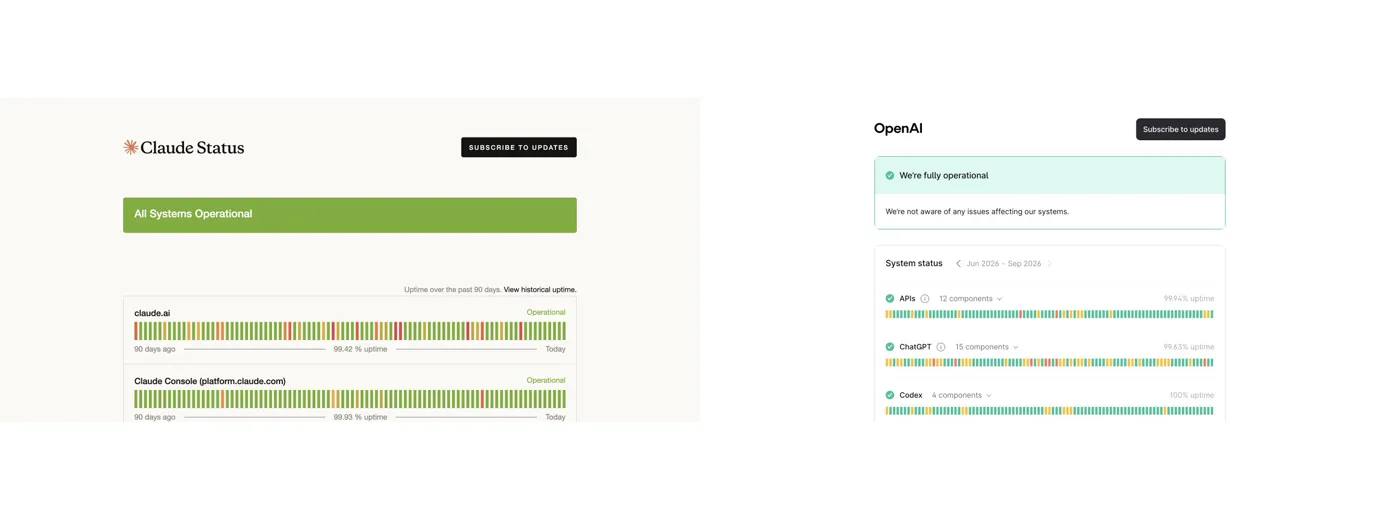
Anthropic's official 90-day status page, captured September 2, showed component uptime ranging from 99.42% to 99.93%. The same-hour OpenAI status page showed ChatGPT at 99.63% and Codex at 100%. These are rolling windows that change over time; both providers show degraded periods, and the snapshots do not validate a permanent platform ranking.
For scale, 99.9% is a common uptime floor in enterprise software contracts. Some components in both snapshots sat below it; others met or exceeded it.
Two more notes from the same coverage. It says Anthropic's government-tier product logged 100% uptime over the same 90-day window, and it did not list a comparable commercial incident for OpenAI's ChatGPT or Codex in that window. Treat that second point as an absence in one report rather than proof of a clean month anywhere else; every provider publishes its own status history, and any of them can post a rough stretch.
What the Numbers Do Not Say
A rough month is a data point rather than a verdict. Any provider can have one, and a clean month in the same window tells you little about the next window.
The government-tier figure shows the same platform running at 100% for a different customer tier over the same 90 days. Commercial small-business plans sit on different terms, and the gap between those tiers is itself useful information about how reliability gets allocated.
The lesson that survives every caveat is structural. No commercial AI tool currently publishes an enterprise-grade SLA to small businesses, so a resilient operation gets designed around downtime rather than promised out of it.
Assess Your Own Exposure First
Before you add anything, map the dependency you already have.
List every workflow that stops when your primary AI tool is down: client deliverables, proposal drafting, meeting prep, reporting, inbox triage, whatever runs through it daily.
Then mark which of those are time-critical, meaning a same-day delay is visible to a client or costs money. That short list is what the rest of this article protects. If it holds more than two or three items, you are carrying single-provider risk your pricing never accounted for.
The Two-Tool Backup Playbook
The playbook is platform-neutral on purpose. It works whichever tool you run as primary, and whichever provider has the next rough month.
- Keep a second AI tool warm. Account set up and signed in, key prompts saved where you can reach them, and one real workflow tested on it quarterly. Warm means you have already run the workflow there once, so an outage morning becomes a switch instead of a scramble.
- Keep prompts and operating instructions in files you own. Chat history inside one platform is trapped context. Save your key prompts, instructions, and templates in a portable doc so your playbook moves with you between tools.
- Define a manual fallback for the two workflows that genuinely cannot wait. Write the by-hand steps once, while you are calm. If both tools ever fail at the same time, the work still ships.
Run the quarterly test on a real deliverable rather than a toy prompt. The point of the exercise is discovering the gaps while nothing is on fire.
Put Uptime in the Vendor File
You checked reliability before choosing your payment processor and your hosting. AI tools now run enough of your operation to earn the same scrutiny.
Uptime data belongs in your vendor evaluation the same way it does for hosting or payments: a factor you check on a schedule, weigh against alternatives, and design around. Status pages and outage trackers make that a quick quarterly habit.
The providers will keep competing on capability. Your job is quieter: make sure no single vendor's bad week can break a commitment you made to a client.
Frequently Asked Questions
Is Claude less reliable than ChatGPT?
A third-party IncidentHub report counted 28 Claude disruptions in one 30-day window, but that does not prove a permanent provider ranking. Same-hour official status pages showed degraded periods for both providers. The safer conclusion is a backup plan rather than a platform verdict.
What uptime should I expect from commercial AI tools?
In the same-hour September 2 snapshots, Anthropic's component uptime ranged from 99.42% to 99.93%; OpenAI showed ChatGPT at 99.63% and Codex at 100%. Those rolling figures change and both providers show degraded periods. No commercial AI tool currently publishes an enterprise-grade SLA to small businesses, so budget for some downtime from any provider.
Is keeping a second AI tool worth the cost?
The playbook costs a second subscription, a saved prompt doc, and one tested workflow per quarter. Weigh that against what a broken morning costs you when a time-critical deliverable stalls, and price the decision on your own numbers.
What if both tools are down at the same time?
That case is what the manual fallback covers. Write by-hand steps for the two workflows that genuinely cannot wait, store them in the same portable doc as your prompts, and the work still ships with every AI tool offline.